thriveOS (previously Zen OS) · Lesson 6 · Video
Daily Review Walkthrough
▸ Show transcript▾ Transcript
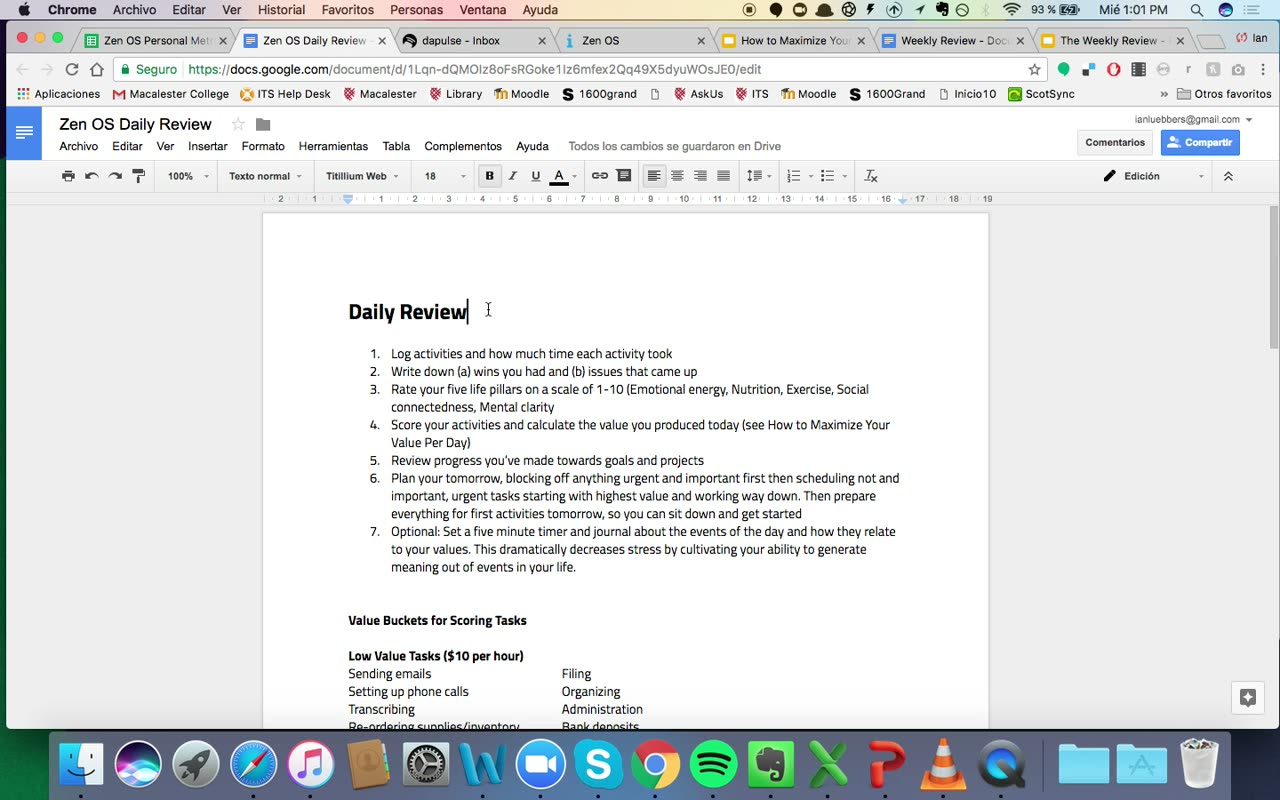
Hey guys, this is going to be a quick video. I just wanted to walk you through the daily review worksheet briefly as well as the personal metrics spreadsheet and also give you a look at the project management system that I use and how it's integrated into this daily and weekly review system. So here is the daily review worksheet and just like I outlined in the video, it
goes through the seven steps to log your activities and how much time each one took, write down wins and issues, rate your five life pillars, score your activities and calculate your daily value, review the progress that you've made towards goals and projects in your project management system, and plan tomorrow, blocking off anything urgent and important, first then scheduling less important urgent tasks, then scheduling not important, but
urgent tasks starting with the highest value and working down. Then prepare, I didn't actually touch on that, I'll touch on that, likely in a future video, but essentially you want to start by scheduling your important and urgent tasks. If you have too many of those, then there's probably something amiss in your business, but first schedule your urgent and important tasks, then schedule your important but not urgent
tasks, these are like your long term tasks. Then you want to prepare everything for the first activities tomorrow, reach the slide so you can sit down and just get started. And then the optional part, set a five minute timer and journal about the events of the day and how they relate to your values, which dramatically decreases stress by cultivating your ability to generate meaning out of events
in your life. So, that's the daily review process, and you should open, you know, you should have this to go through every day, so have it saved on your computer, and when you go through it, I have the value buckets included below so you can quickly and easily score your tasks and calculate your daily value based on the activities that fall under each value bucket. So, that
is the daily review worksheet, very simple. Now, I want to talk about your life pillars and how to maximize your value per day. So, here's the spreadsheet that's included, and there's just a bunch of random numbers thrown in. So, this is how you're going to use it. You're going to have today's date up here, and then you're going to go through, and you're going to rate, you
know, your focus, that's mental clarity, emotional energy, physical activity, life fuel, so that's nutrition, social tribe, that's social connectedness, and then daily value. So, when you do this, you're going to have these numbers pop up on two graphs. One shows your daily metrics, the other shows your daily value, and you'll be able to see, to at least some degree of correlation, how your daily value corresponds to
your life pillars. Now, it's not perfect, but it does give you a really good estimate, and it can tell you, you know, to see here, if you're reading this as some of these metrics, the green, the focus, dipped from a 10 to a 3, and that certainly had a big impact on revenue, and so, you're able to see not only correlation between revenue and your metrics, but
also correlation between, you know, your other metrics, you know, maybe when you don't eat well, you also don't get enough sleep, things like that, or you can just see in general how your life pillars are performing. If they're all high, you're good, if they're all low, then you need to take action, fix that, and if, you know, one or two of them are low, you need to
bring them up before they become a real problem. So, you also have right here your averages, so for the quarter, what your average daily value is, if you're on track to hit your projection, and then what your mental clarity is, what your emotional energy, what your exercise looks like, what your nutrition looks like, and then what your social connectedness looks like on average. So, you want to
just know this is literally like a video game. You want to get these as high as possible, and it's really, really powerful. You do it actually becomes addicting to put these in and try to raise the numbers, and try to get some beautiful looking graphs. So, that is the personal metrics worksheet. Now, I'm going to end by showing you my personal project management system. So, I use
a software called Depulse, and I love it. It's a little bit more complex than most project management softwares, but that makes it customizable. So, I'll show you my specific implementation of it, and you can set it up. I'll probably include an affiliate link or something like that, but for now, you can just go to depulse.com. It's not that expensive. And I'm going to show you how I
run ZenOS on it. So, you know, I'm actually building a software that's going to be a lot better than this and a lot more customized to agency owners. And I'll give you guys the first opportunity to join that. But for now, I just want to, I want to give it to you right now, and it's not built yet. So, this is the best thing available. It's not
perfect, but it's good. So, here's how I use it in the context of daily execution. So, this is a board that I call WinToday, and this is what I have to do today. So, you know, this is my board for today, and I'm completing the ZenOS portions of the program. So, you know, I'm currently recording, so I should be working on this. And I'm just going to
break it down. So, I have this board called WinToday, and then I have Tasks to execute today, and then I just list everything I want to do today. You know, I need to get some toothpaste. I need to take my pants to the dry cleaners. I need to record some more content for this program. And I also have, for each task, a quadrant. And the quadrants are
due to decide, delegate, or delete. So, either something's really urgent, and I need to do it as soon as possible. Something's important, but not urgent. And I need to decide when to do it and schedule it on my calendar. Something is, you know, not something's urgent, but not important, that in that case I delegate, or something that is not urgent, not important, I'll just delete. And so,
I don't ever really click that. If I click that, I just delete it from the board. So, everything is going to be ranked in one of these quadrants. You want to be spending as much time as possible on twos. And then I also have the daily, I also have the value of each task. So, my numbers are different than yours may be given the stage of my
business, but you want to write down, you want to select which, which value bucket it falls into. And you can create these pretty easily. You know, when you play around with the pulse, you'll be able to mimic this pretty easily. And then status, just either working on it, done or, you know, grays, having started. So, that's tasks to execute today. Now, I want to show you also,
and I'll walk through this in more detail probably in the weekly review video, but this is how I track my projects and goals. So, here's the current quarter, quarter three. And these are all the different weeks. You know, I call them sprints, but they're essentially the different weeks in the quarter. And each one has a theme. So, this is my theme for the quarter. My theme actually
changed to the middle of this quarter, which is the reason for the color change. And then whether I'm planning it or working on it, so I'm currently working on sprint number. I believe this is actually be currently working on sprint number eight. And this is how I track how far through the quarter I am. And then for each sprint, I have all of the projects I want
to complete. So, we'll get into this during the weekly review video, and it'll make more sense, but I always have a high level view of all the things I need to be working on. And this is something I'm currently working on. So, I get updated like that. And then for the next sprint, I will update about this actually. Now it's up to days. But this is the
system. And I'll walk through it again in the weekly review video. But the important part for now is like on a when you go through your daily review and review the progress you've made towards goals and projects, what you're really going to be checking is reflection and strategy and win today as well as some of these, which I'll go into in the next video. So, that's what
I wanted to give you today. An overview of the daily review worksheet, how to use it, how to use the personal metrics spreadsheet, and how to integrate it with the project management system. For now, the pulse I recommend in the future, ZenOS is actually the software that I'm building that will do this for you. And it'll be incredibly sophisticated and I'm incredibly excited about that. But for
now, you're going to have to use the pulse or something similar. You can do it on your own if you want, but the pulse just makes it easy. So, that's it for this video. I will see you in the next video.